
 home
home
 Published: May 08, 2026 12:49 PM
 Page View: 108
In industrial automation systems, I/O (Input/Output) modules act as the bridge between PLCs and field equipment, responsible for converting analog and digital signals, transmitting control commands, and collecting real-time operation data. As the "hands and eyes" of automated production lines, the normal operation of I/O modules directly affects the stability and efficiency of the entire system. However, due to harsh industrial environments, frequent signal transmission, wiring errors, and component aging, I/O modules often suffer from faults, leading to equipment misoperation, data collection errors, and even production shutdowns. As a professional supplier of industrial control semiconductors and PLC spare parts, Easy Semiconductor Technology (Hong Kong) Limited summarizes practical methods for quickly diagnosing faulty I/O modules based on years of on-site troubleshooting experience, helping maintenance teams reduce diagnosis time, minimize downtime losses, and ensure the smooth operation of production lines.
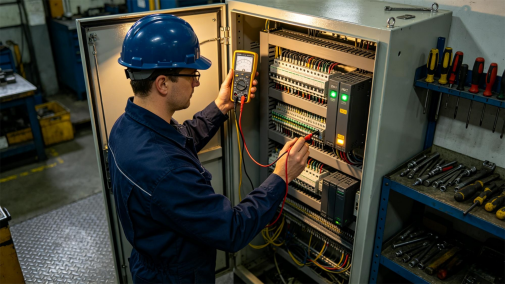
Before starting quick diagnosis, it is crucial to identify common fault manifestations of I/O modules, which can help maintenance personnel quickly narrow down the scope of faults. Faulty I/O modules usually show typical symptoms: input modules fail to collect field signals (e.g., sensor data not displayed on the PLC host), output modules fail to send control commands (e.g., actuators not responding to PLC instructions), intermittent signal jumps, module indicator lights (e.g., power lights off, fault lights on), and even module burnout with abnormal heat or odor. These symptoms are closely related to the working principle of I/O modules, and targeted diagnosis can be carried out according to different manifestations.
The first step in quick diagnosis is visual inspection and indicator light analysis, which is the simplest and most direct method, taking only 5-10 minutes. First, check the power supply of the I/O module: ensure the power voltage matches the module’s rated voltage (common 24V DC), and check whether the power wiring is loose or damaged. If the module’s power indicator is off, it indicates a power supply fault or module burnout. Second, observe the status of the input/output indicator lights: for digital input modules, the indicator light should be on when the field sensor sends a signal; for digital output modules, the indicator light should be on when the PLC sends a control command. If the indicator light is off when a signal is sent, or remains on without a signal, the module or related circuits may be faulty. Easy Semiconductor reminds that visual inspection should also include checking the module’s wiring terminals for looseness, oxidation, or short circuits, as poor contact is a common cause of I/O module faults.
The second step is to use PLC host monitoring and signal testing to further locate faults. Most PLC hosts have built-in monitoring functions that can display the real-time status of I/O points. Maintenance personnel can connect to the PLC host through programming software, check the input/output status of the faulty module, and determine whether the fault is in the module itself or the field circuit. For input modules: simulate a signal input (e.g., connect a sensor manually or use a signal generator) and observe whether the PLC host can receive the signal. If the signal is not received, the input module or wiring is faulty; if the signal is received, the field sensor or circuit is faulty. For output modules: send a control command through the PLC host, measure the output voltage or current of the module terminal with a multimeter, and check whether the output signal is normal. If there is no output signal, the output module is faulty; if there is an output signal but the actuator does not respond, the actuator or output circuit is faulty.
The third step is to use substitution testing to confirm faulty modules quickly, which is the most efficient method for complex faults. When the above two steps cannot determine whether the module is faulty, replace the suspected faulty I/O module with a new or known good module (consistent with the model and specifications). If the fault is eliminated after replacement, it indicates that the original module is faulty; if the fault still exists, the problem lies in the wiring, field equipment, or PLC program. Easy Semiconductor provides compatible, high-quality I/O modules that are fully compatible with mainstream PLC brands, ensuring that maintenance personnel can quickly replace faulty modules and resume production in a short time.
In addition, it is necessary to pay attention to common fault points and preventive measures to reduce the frequency of I/O module faults. Common fault causes include: overvoltage/overcurrent impact (leading to module burnout), electromagnetic interference (causing signal distortion), harsh environmental factors (high temperature, high humidity, dust accelerating component aging), and incorrect wiring (short circuit or reverse connection). To avoid these faults, install surge protectors for I/O modules to prevent voltage impact, use shielded cables for signal wiring to enhance anti-interference performance, regularly clean the module and control cabinet, and standardize wiring operations.
In conclusion, quickly diagnosing faulty I/O modules requires mastering the steps of "visual inspection → PLC monitoring → substitution testing", which can help maintenance teams locate faults in 30 minutes or less. Easy Semiconductor Technology (Hong Kong) Limited is committed to providing industrial control solutions for manufacturing enterprises, offering high-quality I/O modules, professional troubleshooting guidance, and on-site technical services. By adopting scientific diagnosis methods and using reliable spare parts, enterprises can effectively reduce the impact of I/O module faults, improve production efficiency, and ensure the stable operation of industrial automation systems.